---
title: "Let’s Buy a Computer, Part IV"
description: "For the final part of our Computer buying guide we talk a little bit about the miscellaneous points you should consider before buying a new computer."
url: "https://www.omegatechnicalsolutions.com/blog/let-s-buy-a-computer-part-iv"
date: "2026-06-30T01:08:44+00:00"
language: "en-GB"
---
## Omega Technical Solutions Blog
Omega Technical Solutions has been serving the Haymarket area since 2007, providing IT Support such as technical helpdesk support, computer support, and consulting to small and medium-sized businesses.
[ Categories ](https://www.omegatechnicalsolutions.com/blog/categories "Categories")
[ Tags ](https://www.omegatechnicalsolutions.com/blog/tags "Tags")
[ Categories: All Categories ](https://www.omegatechnicalsolutions.com/javascript:void(0); "Categories")
Search...Suggested keywords
[ x ](https://www.omegatechnicalsolutions.com/javascript:void(0);)
# Let’s Buy a Computer, Part IV
[Omega Technical Solutions Blog](https://www.omegatechnicalsolutions.com/blog/categories/blog) [Technology](https://www.omegatechnicalsolutions.com/blog/categories/technology)
[Steven Holmes](https://www.omegatechnicalsolutions.com/blog/blogger/steven-holmes)
Monday, 19 August 2019
[ 0 Comments ](https://www.omegatechnicalsolutions.com/blog/let-s-buy-a-computer-part-iv#comments)
[  ](//www.omegatechnicalsolutions.com/images/easyblog_shared/August_2019/8-19-19/computer-graphic-card-on-white-background-PCGPFN5_400.jpg "Let’s Buy a Computer, Part IV")
After you’ve got the machine’s core specifications worked out, you then have to turn your attention to your displays. In part four, we take a look at how you are going to broadcast the information from the computer, what you should know about modern displays, and what considerations you need to take.
## Multi-Monitor Display?
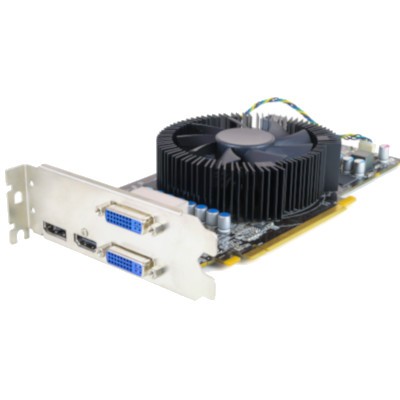
Most computers you’ve used have had a single screen, but there are people out there with over 10. How do they manage that? With the built-in support of the OS that you are using. If you are interested in having more than one display, you need to take a few things into consideration. One consideration you will have to make is how many display out ports your PC has. If you only have one single port, you need to find a way to get other displays to connect to your new machine. Some of the common connections you will see include:
- **VGA:** The standard for a long time, these older connections have an isosceles trapezoid connector with little pins that have screws that connect the wire to the machine. All older monitors will have these connections, but most desktops have at least one VGA port to make sure they are compatible with older monitors.
- **HDMI:** HDMI is the same connection that you use to connect your streaming player, Blu-Ray player, or gaming console to your TV. These are the standard in A/V equipment at the moment as it broadcasts both audio and video.
- **DisplayPort:** DisplayPort is similar to HDMI. It can carry both video and audio, and it’s set to become the standard connection. For our purposes though, you can think of DisplayPort and HDMI as very similar.
Budget desktops will demand that you have a solid understanding of the many ports of the device, as it would only cost you more money by purchasing monitors that aren’t compatible with it. Some types of devices will even need specific connectors and adapters.
## Integrated Video vs Dedicated Graphics
Depending on what you are doing with your computer, you may need to incorporate a graphics card rather than relying on the functionality that is built into the motherboard. Most PCs built for office productivity, however, won’t need anything like that. Machines that are earmarked for video production, graphic design, engineering software, and the like, will. The more strain you are going to put on your system’s graphics, the higher the price will get. Some high-end graphics cards can cost nearly $1,500.
Most graphics card chipsets have multiple models, and since many companies like to sell their own brands of hardware, it can be a little intimidating to browse all of your options. If you are looking for a solid graphics card--and don’t have to concern yourself with 3D rendering or video editing--standard grade cards will do. For the most part, unless you’re using a computer for extremely specialized tasks, your desktop’s built-in hardware will more than suffice.
## Do You Need Monitors for Your Desktops?
You can be overwhelmed by the amount of options and specifications of monitors. The two variables to concern yourself with are resolution and refresh rate. Here are some key factors to consider for both:
- **Resolution:** The resolution of a monitor is how many pixels it can display. Most desktop monitors will render in a 16:9 display ratio, or widescreen. This is the current standard, but there are ultra-wide monitors that use more advanced display ratios like HD, FULL HD, Ultra HD, or 4K.
- **HD:** HD is the most common resolution, and it’s commonly known as 720p. It is the standard for budget laptops.
- **FULL HD:** Full HD is often referred to as 1080p, and it’s the most common resolution you’ll find while shopping for displays.
- **Ultra HD:** Ultra HD has a pixel resolution of 3840 x 2160. This might not be available on low-end desktops, so be sure to look into it before thinking of it as a legitimate option.
- **4K:** 4K is a higher resolution than UHD, but are typically interchangeable. These displays are far more expensive than what any office needs, but they are ideal for video production, graphic design, gaming, and other visual tasks. Budget hardware will likely not even support 4K, though this is a trend that is slowly being broken down.
- **Refresh Rate:** Refresh rate is measured in milliseconds, and it’s a statistic that is used to measure how quickly a monitor can update its image. Low refresh rates give the impression that clicking or moving the mouse is delayed, as the monitor cannot register the movement quickly enough. This used to be a much bigger issue in the past, but unless you’re a gamer, you won’t need to worry about it much.
If you’d like some help with the displays and configuration of your business’ IT, reach out to the IT professionals at COMPANYNAME today at PHONENUMBER.
[ ](https://www.omegatechnicalsolutions.com/javascript:void(0);) [ ](https://www.omegatechnicalsolutions.com/javascript:void(0);) [ ](https://www.omegatechnicalsolutions.com/javascript:void(0);)
Tags:
[Hardware](https://www.omegatechnicalsolutions.com/blog/tags/hardware) [Miscellaneous](https://www.omegatechnicalsolutions.com/blog/tags/miscellaneous) [Computer](https://www.omegatechnicalsolutions.com/blog/tags/computer)
[ Let’s Buy a Computer, Part V ](https://www.omegatechnicalsolutions.com/blog/let-s-buy-a-computer-part-v)
[ Let’s Buy a Computer, Part III ](https://www.omegatechnicalsolutions.com/blog/let-s-buy-a-computer-part-iii)
About the author
[  ](https://www.omegatechnicalsolutions.com/blog/blogger/steven-holmes)
[Steven Holmes](https://www.omegatechnicalsolutions.com/blog/blogger/steven-holmes)
[ ](https://www.omegatechnicalsolutions.com/javascript:void(0); "Subscribe to updates from author") [ ](https://www.omegatechnicalsolutions.com/javascript:void(0);) [ ](https://www.omegatechnicalsolutions.com/blog/blogger/steven-holmes)
Mr. Holmes is responsible for the structure, strategy and execution of Omega Technical Solutions’ team. He also has an extensive background in designing, engineering, and securing Enterprise and Data Center networks.
Author's recent posts
[More posts from author](https://www.omegatechnicalsolutions.com/blog/blogger/steven-holmes)
[ Monday, 29 June 2026 Why Small Practices Cannot Ignore HIPAA Compliance ](https://www.omegatechnicalsolutions.com/blog/why-small-practices-cannot-ignore-hipaa-compliance)
[ Saturday, 27 June 2026 How to Actually Make a Quiet Day Work for Your Business ](https://www.omegatechnicalsolutions.com/newsletter-content/how-to-actually-make-a-quiet-day-work-for-your-business)
[ Friday, 26 June 2026 How to Stop Data Theft Without Spying on Your Team ](https://www.omegatechnicalsolutions.com/blog/how-to-stop-data-theft-without-spying-on-your-team)
Comments
No comments made yet. Be the first to submit a comment
**** Already Registered? [Login Here](https://www.omegatechnicalsolutions.com/component/users/login?return=aHR0cHM6Ly93d3cub21lZ2F0ZWNobmljYWxzb2x1dGlvbnMuY29tL2Jsb2cvbGV0LXMtYnV5LWEtY29tcHV0ZXItcGFydC1pdg==&Itemid=101)
Tuesday, 30 June 2026
Subscribe to the blog (Please fill in your email address to subscribe to updates from this post.)
**Captcha Image**
## Schema
```json
{
"@context": "https://schema.org",
"@type": "BreadcrumbList",
"itemListElement": [
{
"@type": "ListItem",
"position": 1,
"name": "Home",
"item": "https://www.omegatechnicalsolutions.com"
},
{
"@type": "ListItem",
"position": 2,
"name": "Blog",
"item": "https://www.omegatechnicalsolutions.com/blog"
},
{
"@type": "ListItem",
"position": 3,
"name": "Steven Holmes",
"item": "https://www.omegatechnicalsolutions.com/blog/blogger/steven-holmes"
},
{
"@type": "ListItem",
"position": 4,
"name": "Let’s Buy a Computer, Part IV",
"item": "https://www.omegatechnicalsolutions.com/blog/let-s-buy-a-computer-part-iv"
}
]
}
```